Buy Chornobyl Liquidators - Supporter Pack / EU
DLC
Platform:
Windows
Genre:
Simulator
Publisher:
Frozen Way S.A.
Activation:
Steam
Release Date:
6 june 2024
Languages:
English
Type:
Key
Region:
EU
8 $
 In stock
Extra Content
Chornobyl Liquidators / EU required to run
For all those dedicated to aiding in the aftermath of the Chornobyl disaster, we’ve crafted an exclusive Supporter Pack. This pack provides even more immersive elements and exclusive content from the game’s development process.
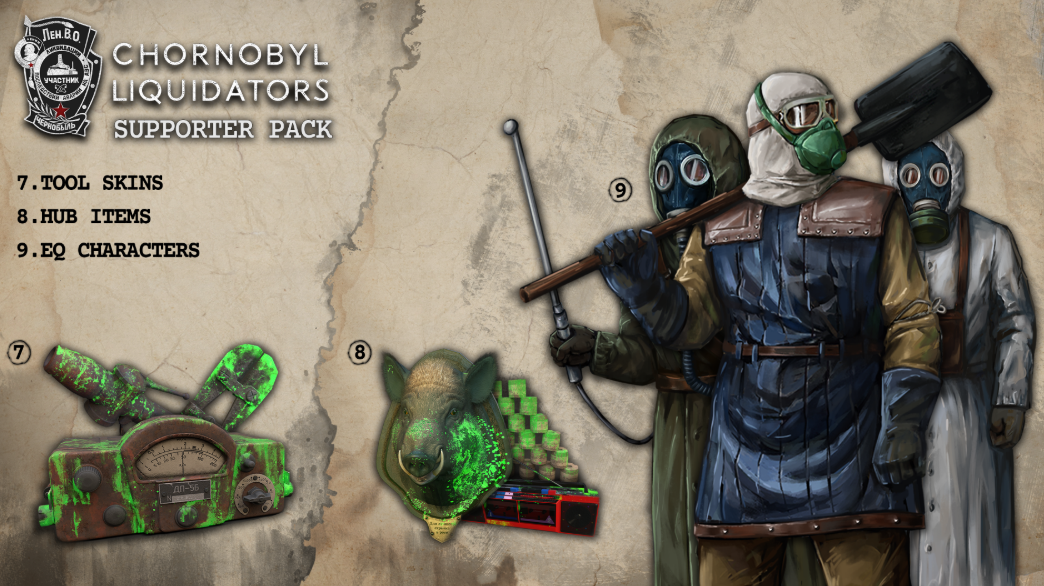
Exclusive Tool Skins
To amp up your Chornobyl cleanup experience, we’ve added the option to switch up the skins for all 7 in-game tools.
- Trick out your tools with a unique radiated look that stands out!
HUB Customization
Tired of a plain and basic HUB? We’ve added a twist to your visual experience with exciting customization options!
- Beautify your HUB with extra elements, like a wild boar trophy.
Hero skins
Our pack also lets you change your Liquidator's skin. Choose from 4 options and find your style.
- Switch up your appearance with 4 unique skins (1 universal, 3 additional)
Additional Exclusive Elements
Dive deeper into the game's world with our extra additions. Enjoy graphical and musical elements all in one place.
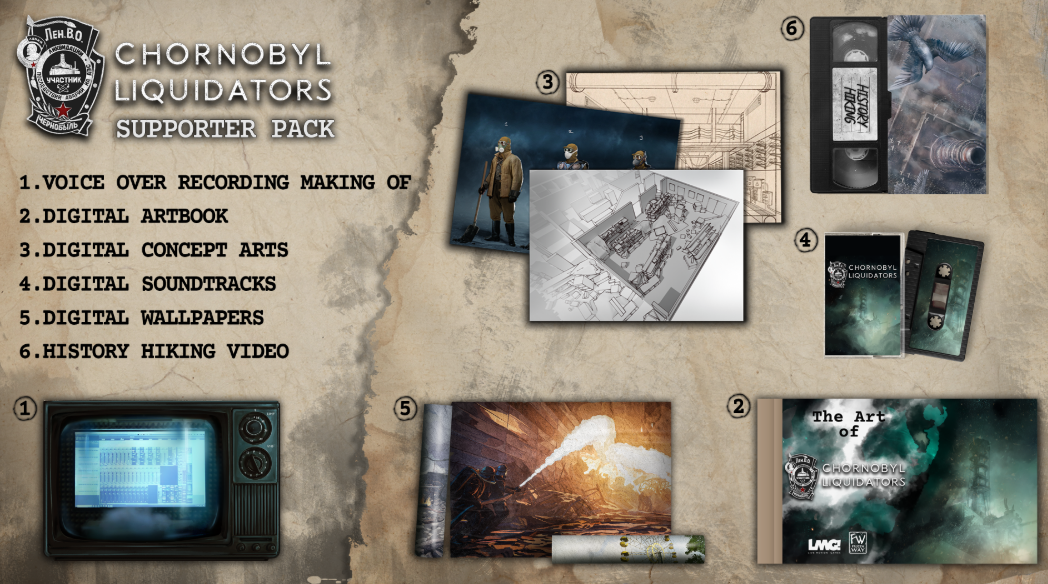
- Experience the Original Soundtrack that takes you straight into the danger zone, letting you feel the true impact of the Chornobyl disaster.
- Keep the immersion going even after your game sessions with animated wallpapers.
- Discover the artistic vision behind the game with a unique set of concept art prepared by our team.
- Flip through the pages of our artbook, filled with carefully selected graphics that cover our game world.
Exclusive Tool Skins
To amp up your Chornobyl cleanup experience, we’ve added the option to switch up the skins for all 7 in-game tools.
- Trick out your tools with a unique radiated look that stands out!
HUB Customization
Tired of a plain and basic HUB? We’ve added a twist to your visual experience with exciting customization options!
- Beautify your HUB with extra elements, like a wild boar trophy.
Hero skins
Our pack also lets you change your Liquidator's skin. Choose from 4 options and find your style.
- Switch up your appearance with 4 unique skins (1 universal, 3 additional)
Additional Exclusive Elements
Dive deeper into the game's world with our extra additions. Enjoy graphical and musical elements all in one place.
- Experience the Original Soundtrack that takes you straight into the danger zone, letting you feel the true impact of the Chornobyl disaster.
- Keep the immersion going even after your game sessions with animated wallpapers.
- Discover the artistic vision behind the game with a unique set of concept art prepared by our team.
- Flip through the pages of our artbook, filled with carefully selected graphics that cover our game world.
Minimum Requirements
Windows
OS Windows® 10
Processor AMD Ryzen 3 1200 / Intel Core i5-6600K
Memory 8 GB RAM
Graphics AMD Radeon R9 280X / Nvidia GeForce GTX 1050 Ti
DirectX Version 11
Storage 40 GB available space
If you are not familiar with the technical information of your PC, download the CPU-Z program. CPU-Z will give you detailed information about the main system components - CPU, RAM, video card - installed on your system, which you can then compare with the minimum requirements of the game.
- Go to: http://store.steampowered.com/ and download STEAM client
- Click "Install Steam" (from the upper right corner)
- Install and start application, login with your Account name and Password (create one if you don't have).
- Please follow these instructions to activate a new retail purchase on Steam:
- Launch Steam and log into your Steam account.
- Click the Games Menu.
- Choose Activate a Product on Steam...
- Follow the onscreen instructions to complete the process.
- After successful code verification go to the "MY GAMES" tab and start downloading.
Videos & Screenshots



- Payments
-

-

-

-

-

-

-

-

-