Buy SCUM Supporter Pack

DLC
Platform:
Windows
Genre:
Action
Publisher:
Gamepires
Activation:
Steam
Release Date:
28 september 2018
Languages:
English
Type:
Key
Region:
EU
10 $
 In stock
Extra Content
SCUM required to run
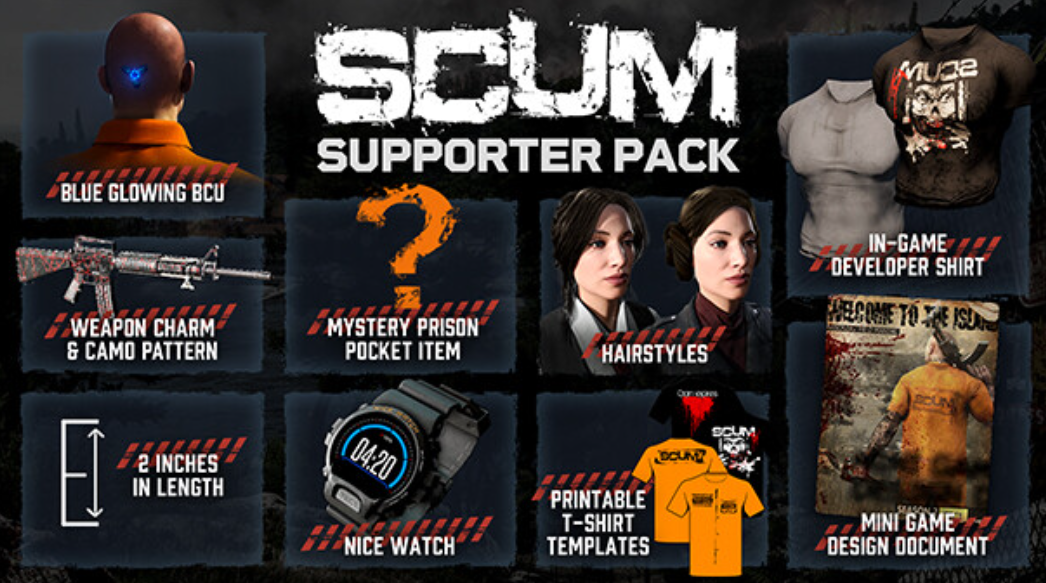
Hello everyone – we are thrilled to announce the SCUM Supporter Pack. This is a bundle of extra goodies for players who want to go another extra mile to support our SCUM developers.
All items are purely for visual purpose and do not affect game play in any impactful way – but they do look really cool. The SCUM Supporter Pack includes the following digital items:
- Unique blue glowing BCU.
- SCUM developer undershirt that only people who have worked on SCUM have.
- Exclusive weapon camo pattern and charm.
- Mini Game Design Document – so you can see how SCUM was made from the beginning!
- Templates for our orange and black t-shirts so you can print them out for yourself.
- Mystery prison pocket item. How to claim it? You'll figure it out...
- Nice Watch (in-game watch).
- 2 inches in length.
- Willy Warmer.
- Whistling.
- 2 new hairstyles.
Thank you everybody, from the bottom of our hearts, for all your support.
All items are purely for visual purpose and do not affect game play in any impactful way – but they do look really cool. The SCUM Supporter Pack includes the following digital items:
- Unique blue glowing BCU.
- SCUM developer undershirt that only people who have worked on SCUM have.
- Exclusive weapon camo pattern and charm.
- Mini Game Design Document – so you can see how SCUM was made from the beginning!
- Templates for our orange and black t-shirts so you can print them out for yourself.
- Mystery prison pocket item. How to claim it? You'll figure it out...
- Nice Watch (in-game watch).
- 2 inches in length.
- Willy Warmer.
- Whistling.
- 2 new hairstyles.
Thank you everybody, from the bottom of our hearts, for all your support.
Minimum Requirements
Requires a 64-bit processor and operating system
OS Windows 10 64-bit
Processor Intel Core i5-4430 / AMD FX-6300
Memory 10 GB RAM
Graphics NVIDIA GeForce GTX 1060 3GB / AMD Radeon R7 370 4GB
DirectX Version 11
Network Broadband Internet connection
Storage 80 GB available space
Additional Notes SSD
If you are not familiar with the technical information of your PC, download the CPU-Z program. CPU-Z will give you detailed information about the main system components - CPU, RAM, video card - installed on your system, which you can then compare with the minimum requirements of the game.
- Go to: http://store.steampowered.com/ and download STEAM client
- Click "Install Steam" (from the upper right corner)
- Install and start application, login with your Account name and Password (create one if you don't have).
- Please follow these instructions to activate a new retail purchase on Steam:
- Launch Steam and log into your Steam account.
- Click the Games Menu.
- Choose Activate a Product on Steam...
- Follow the onscreen instructions to complete the process.
- After successful code verification go to the "MY GAMES" tab and start downloading.
Videos & Screenshots



- Payments
-

-

-

-

-

-

-

-

-